
Architecting the Real-Time Lakehouse: From GoldenGate Ingestion to Oracle AIDP
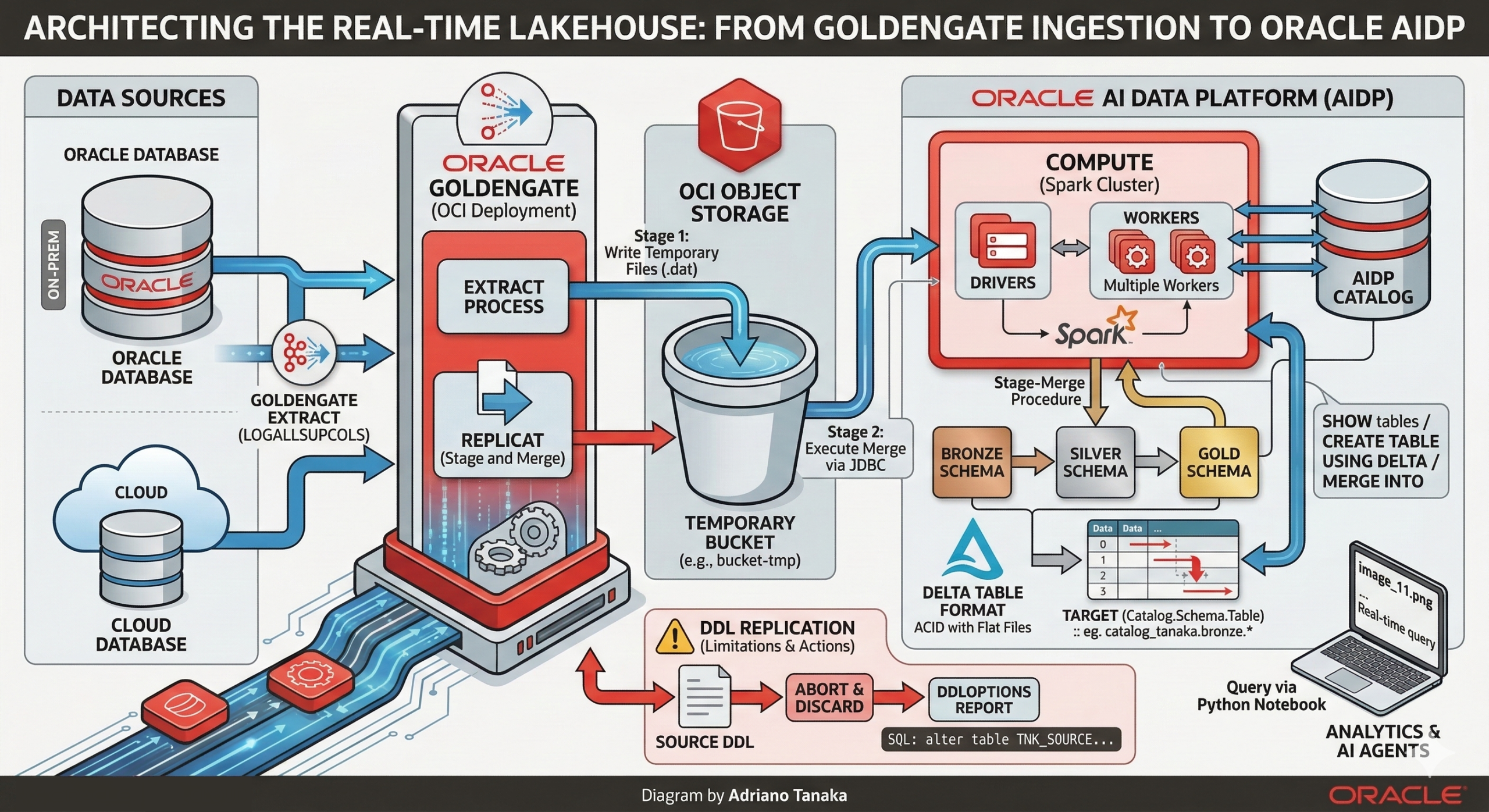
Oracle AI Data Platform or simply AIDP is a platform where companies could build their Lakehouse’s using bleeding-edge technologies like AI Agents, Open Table formats and Spark as the engine of their processing layer.
Adding Oracle GoldenGate to this topology is the right way to bring near real time data movement capabilities, in this article I will talk about both technologies, how Oracle GoldenGate interacts with AIDP, what are the requirements and so on.
AIDP Architecture
Before diving into the replication process, it’s important to understand the key components of AIDP architecture:
Catalog
The AIDP Catalog is a resource that centralizes the metadata of your datasets, doing a parallel within Oracle Database, like the Data Dictionary, it allows you to setup the data governance and other features like mapping and managing structured and unstructured data (like files in Object Storage)
Schema
In the schema there will be the logical structure of your datasets just like a schema from Oracle Database, you can have tables and views.
Table
Here we can see one of the most important AIDP features, the support for Delta table format, using Delta table we can have ACID features with “flat files” in a cloud storage
Compute
The Compute resource from AIDP is responsible for delivering Spark Environment, you can use CPU org GPU machines, divided in Drivers and Workers nodes (you can even have multiple workers if your workload needs to).
AIDP has more components but for GoldenGate we will use the previous ones:
The replicat process will connect to a JDBC endpoint (it runs inside the compute cluster), it will use the three-part namespace (Catalog.Schema.Table) to identify the target object and execute a stage-merge procedure.
Creating the required resources in AIDP:
First, we will create a Catalog :

It may be a Standard Catalog type.

Now let’s create our schema, here I will be using the medallion architecture (Bronze, Silver and Gold) and my schema will be “bronze”:

The workspace is used to organize your resources, mainly the python notebooks but could be used to build workflows and most importantly, inside your workspace you will have the compute cluster that provides the compute power to run your workloads.


When deploying your Compute cluster you can define the size of it and the python version, for whom is used to work with Spark it’s easy to spot the similarity, here you have the Drivers and Workers nodes.
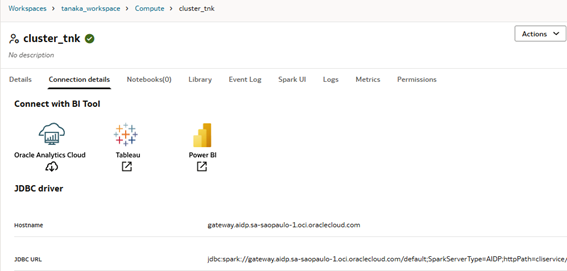
After the cluster creation, go to Connection Details tab, there you will see the JDBC URL, we need it to setup the GoldenGate connection.
Data Delivery
Oracle GoldenGate has multiple formats when we are talking about data delivery, here we will work with Stage and Merge replicat, where our data is stored inside a OCI Object Storage and merged into Delta tables inside AIDP, but you can send data to a bucket in avro/parquet file and ingest into AIDP table using PySpark.
Connections
I’m using the OCI GoldenGate but for the on-premises version it should be similar, you need to use the JDBC endpoint with tenancy and user OCID, region, just like a normal OCI authentication, you can always refer to official documents https://docs.oracle.com/en/middleware/goldengate/big-data/23/gadbd/qs-realtime-data-ingestion-oracle-ai-data-platform-oracle-goldengate-daa.html#GUID-52A45276-7087-432E-ADC3-76A48D2E4A9E if you have doubts.
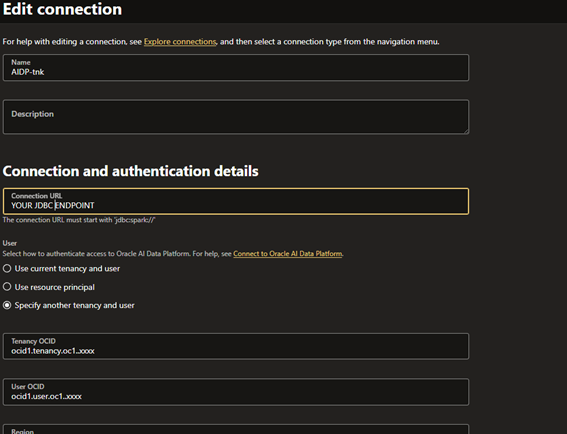
Besides the AIDP connection you will need an OCI Object Storage connection.
Extract
For the extract I suggest you use these parameters:
ddl include mapped - -> To capture DDL from mapped objectsLOGALLSUPCOLS - -> To capture all columns, we will need this in the target sideReplicat
Stage and Merge
Using the default replicat, where we write directly into AIDP tables:

In your properties file define the temporary bucket and the compartment with these parameters:
gg.eventhandler.oci.compartmentID=ocid1.compartment.oc1..aaaXXXXgg.eventhandler.oci.bucketMappingTemplate=bucket-tmpIn parameter file we must configure the Catalog.Schema mapping, something like this:
MAP *.*, TARGET catalog_tanaka.bronze.*;In this case the temporary dat file will be generated in bucket-tmp bucket and the final data will be written into the catalog_tanaka catalog inside the bronze schema, using the specified JDBC endpoint from connection.
If everything is correctly configured when can track the steps from Spark UI (Cluster > Spark UI option > SQL / DataFrame tab):

As you can see, first the replicat will see if the table exists (SHOW tables command) and starts to generate the temporary files into the bucket:

The table will be created, note the USING DELTA parameter:

And finally, the data will be merged:

And we can use a Python Notebook to query it:

Because I’m using a wildcard in the map parameter, I just need to trigger a DML from my source DB and It will replicate the table:


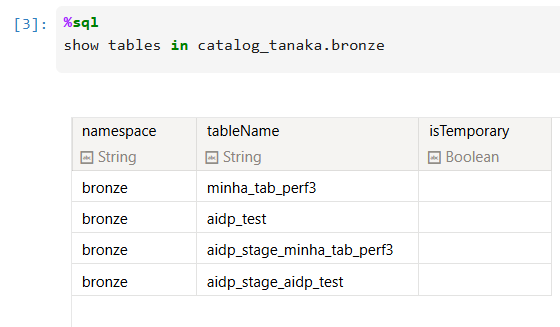
Did you notice that _stage_ tables? They’re here to do the merge from the Object Storage files.
DDL Replication
As of today, there is no DDL replication available for AIDP targets, so you must choose what action to take when a DDL happens at the source.
Use the DDLOPTIONS REPORT parameter in your replicat parameter to print the DDL and you can work with EVENTACTIONS to ignore (STOP) or abend the process(ABORT).
With this combination of parameters:
DDL INCLUDE ALL EVENTACTIONS (REPORT, ABORT) EXCLUDE OPTYPE CREATEDDLOPTIONS REPORTYou will have this in your discard file:
Operation discarded due to ABORT event from DDL on object name tanaka.MINHA_TAB_PERF3 in file /u02/Deployment/var/lib/data/aidp/aa000000001, RBA 6789660SQL Operation [alter table TNK_SOURCE.MINHA_TAB_PERF3 add (cpf2 varchar2(10)) (size 62)]So, it should be easy to fix that issue.
The integration allows organizations to leverage GoldenGate’s proven replication power to feed a high-performance Spark/LakeHouse environment, enabling real-time analytics and AI-ready data layers within the Oracle ecosystem.